
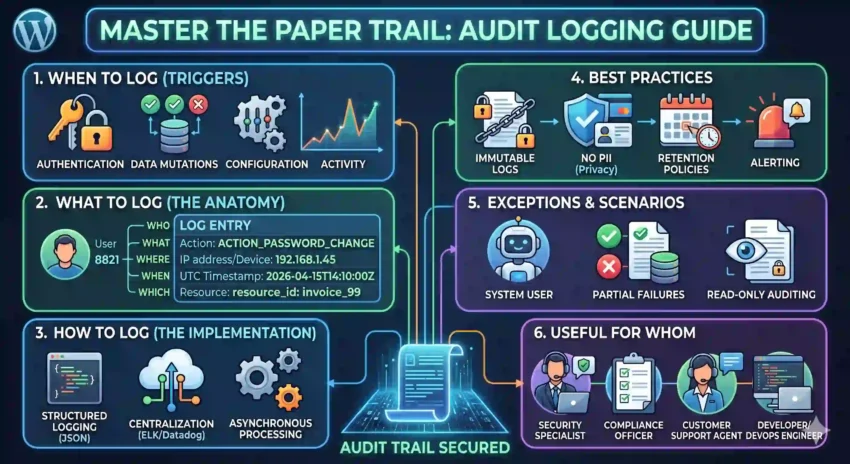
In the world of software development, an audit log is your application’s “black box.” When things go sideways—whether it’s a security breach, a compliance hurdle, or a mysterious data discrepancy—the audit log is often the only thing standing between a quick resolution and a week-long forensic nightmare.
But logging “everything” isn’t a strategy; it’s a storage bill. To build a system that is actually useful, you need a structured approach. Let’s break down how to master the art of the audit trail.
1. When to Log? (The Triggers)
You shouldn’t log every mouse movement, but you must capture every state change and security event. Think of it as logging the “pivot points” of your data.
-
Authentication Events: Login successes, failures, and logouts.
-
Authorization Changes: When a user’s permissions are elevated or revoked.
-
Data Mutations: Any
Create,Update, orDelete(CUD) operations on sensitive records. -
System Configuration: Changes to environment variables, feature flags, or system settings.
-
Data Exports: When someone downloads a CSV or triggers a large data report.
2. What to Log? (The Anatomy of a Log)
A log entry is useless if it says “User updated a file” without saying who, when, or which file. Every entry should answer the “5 Ws”:
| Field | Description | Example |
| Who | The Actor (User ID or Service Name) | user_id: 8821 |
| What | The Action performed | ACTION_PASSWORD_CHANGE |
| Where | The Source (IP address, Device, or API endpoint) | 192.168.1.45 |
| When | Precise Timestamp (Always in UTC) | 2026-04-15T14:10:00Z |
| Which | The Resource affected | resource_id: invoice_99 |
3. How to Log? (The Implementation)
Modern logging is less about writing to a .txt file and more about Structured Logging.
-
Use JSON Format: Standardizing logs in JSON makes them machine-readable. This allows tools like ELK (Elasticsearch, Logstash, Kibana) or Datadog to index and search them instantly.
-
Asynchronous Processing: Don’t make your user wait for a database write just to log an event. Use a message queue (like RabbitMQ or Kafka) to handle logging in the background.
-
Centralization: Never store logs only on the local server. Use a centralized log management system so that if a server goes down (or is compromised), the evidence remains.
4. Best Practices
To keep your logs clean and compliant, follow these golden rules:
-
Immutable Logs: Audit logs should be “Append-Only.” No one—not even an admin—should be able to edit or delete a log entry.
-
No PII (Personally Identifiable Information): Never log passwords, credit card numbers, or health records. If you must log a name, use a unique ID instead.
-
Retention Policies: Define how long you keep logs (e.g., 1 year for compliance, 30 days for debugging) to manage storage costs.
-
Alerting: Logs are reactive; alerts are proactive. Set up triggers for suspicious patterns, like 50 failed login attempts in one minute.
5. Exceptions and Scenarios
Logging isn’t always straightforward. Here is how to handle the “gray areas”:
-
The “System” User: Sometimes a background job (like a subscription renewal) changes data. Ensure these are logged as
actor: system_jobso you don’t hunt for a human that doesn’t exist. -
Partial Failures: If a user tries to delete ten records but only five succeed, your log should clearly reflect the partial success and the specific error codes for the failures.
-
Read-Only Auditing: For highly sensitive data (like payroll or medical records), you should log even View (Read) actions. Knowing who looked at data can be just as important as knowing who changed it.
6. Who is this useful for?
Audit logs aren’t just for developers. A well-implemented log serves the entire organization:
-
Security Teams: To detect breaches and perform post-mortem investigations.
-
Compliance Officers: To prove to auditors (HIPAA, GDPR, SOC2) that the business follows data integrity rules.
-
Customer Support: To answer user questions like, “Why was my subscription cancelled?” by seeing exactly who performed the action.
-
Developers/DevOps: To debug complex production issues where the “state” of the data seems impossible.
Ready to start logging?
Start small. Map out your most critical data path today and ensure you’re capturing the “Who, What, and When.” Your future self will thank you.